Encrypted connections
HTTPS · TLS
HTTPS uses TLS to protect information travelling between your browser and the website. This helps prevent interception or alteration of information while it is in transit.
A practical view of the safeguards behind our website: how connections, browser controls, forms and private records are protected, with evidence you can explore and checks you can run.
Reviewed
A+Three independent technical ratings
2Public websites checked
8Protection layers explained
How the safeguards fit together
Security depends on several controls working together. These are the main safeguards supporting the website journeys and information you entrust to CanCham.
HTTPS · TLS
HTTPS uses TLS to protect information travelling between your browser and the website. This helps prevent interception or alteration of information while it is in transit.
CSP · HSTS · anti-framing
Content Security Policy limits the content a browser may load. HSTS tells browsers to use HTTPS, while anti-framing and content-type policies help restrict unwanted embedding and unsafe interpretation of files.
Sessions · CSRF · validation
Sign-in and form flows use session, nonce or CSRF checks to verify the intended request. Submitted values are validated, and repeated-request controls help reduce automated misuse.
Permissions · sensitive actions
Staff tools check permission for the action being performed. Sensitive tasks have additional checks, helping keep membership, finance and content responsibilities within the appropriate authorised role.
File content · type · size
Upload checks inspect file content, type and size rather than trusting a filename alone. Submitted rich content is sanitised to retain supported formatting while removing executable markup.
Signed links · private caching
Financial documents use protected access and signed document links. Private financial responses use no-store caching policies. Payment proofs and account tokens are excluded from public directory content.
Consent · publication review
Directory publication follows the consent and approval arrangements in our Privacy notice. Public organisation listings are separated from private application, account and financial records.
Regression tests · source review
Selected sign-in, registration, payment and admin journeys are checked with synthetic test records. Source comparisons and post-deployment checks help catch regressions and confirm the intended files are published.
Dated evidence
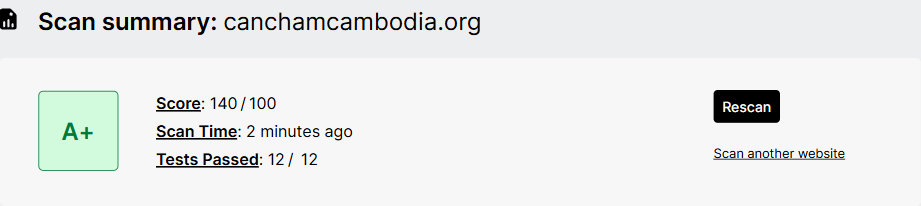
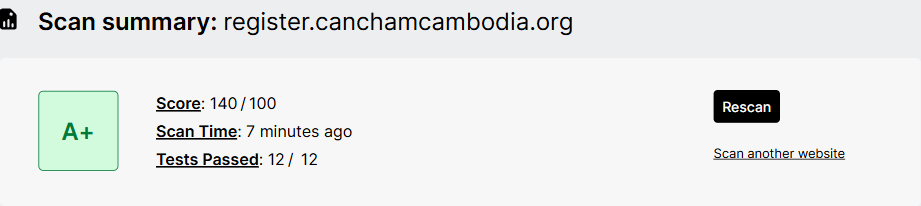
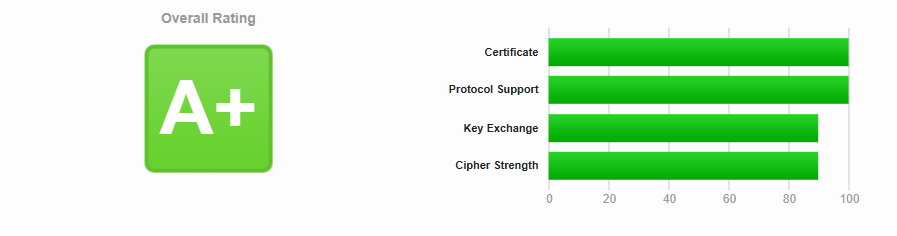
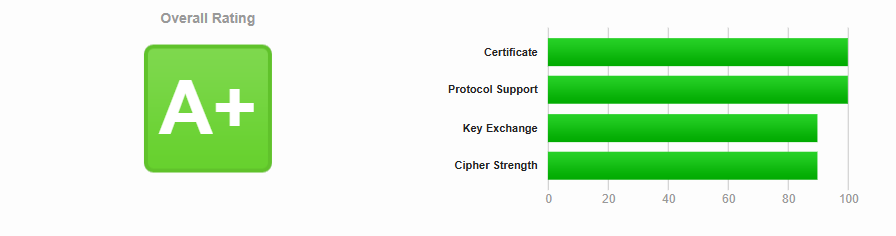
Both our public website and registration website received the results below on . Select a summary image to view it at full size.
A+
A+ on both sites
140 points · 12 of 12 tests passed
Examines browser-facing security policies, including controls that help limit unwanted scripts, framing and insecure content.
How Mozilla scores its checks (opens in a new tab)A+
A+ on both sites
Response-header configuration
Reviews the security headers returned by each website and the browser protections those headers enable.
How SecurityHeaders assesses headers (opens in a new tab)A+
A+ on both sites
Encrypted connection configuration
Assesses the HTTPS connection and its TLS configuration, including certificate and protocol support.
Read the SSL Labs rating guide (opens in a new tab)These dated results cover the technical scope described for each provider. They support transparency and are separate from a complete security audit or certification. Use the test starters below for a fresh assessment.
Explore for yourself
Copy a public domain or URL, then open the tool you want to use. These external services run their own tests and explain their own results.
Domaincanchamcambodia.org
URLhttps://canchamcambodia.org/
Domainregister.canchamcambodia.org
URLhttps://register.canchamcambodia.org/
You can also select and copy either address directly.
Browser security
Run a browser-policy assessment and see how the response headers are scored.
Start an Observatory check (opens in a new tab)Browser security
Check the security headers a public website returns and the protections they declare.
Start a header check (opens in a new tab)Connection security
Assess the public HTTPS certificate, supported protocols and TLS configuration.
Start an SSL server test (opens in a new tab)Site reputation
Look up whether Google reports known unsafe content for either public address.
Check the public website (opens in a new tab) Check the registration website (opens in a new tab)Performance & accessibility
Explore page performance and automated accessibility checks. These measure page quality, rather than the security grades above.
Start a PageSpeed analysis (opens in a new tab)Markup quality
Check a page’s HTML markup for conformance issues. Valid markup is a code-quality check, rather than a security rating.
Start an HTML check (opens in a new tab)Browser security and HTTPS tests, unsafe-content reputation, performance, accessibility checks and markup validation answer different questions. A result in one category does not certify the others.
0 known advisories
Automated checks found no known security advisories for the reviewed website components on this date. Checking published advisories helps identify components that need attention; it does not cover undiscovered issues.
Checked 12 November 2026
Automated checks reviewed
Semgrep Community Edition was used to look for common weaknesses in website code, alongside targeted manual review. Detailed findings remain private. Automated coverage and manual review have limits; this is not a security grade or certification.
Run 12 November 2026
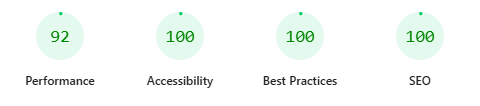
92–97 performance
Three Google Lighthouse mobile lab runs recorded 92, 97 and 92 for performance (median 92). Accessibility, best practices and SEO scored 100 in each run. Performance varies with the device, connection and test run.
Checked 12 November 2026
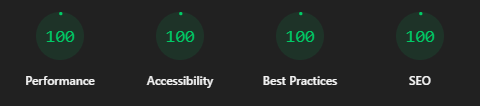
100 performance
One Google Lighthouse desktop lab run recorded 100 for performance, accessibility, best practices and SEO. This dated result describes the homepage and test profile; scores vary with the device, connection and test run.
Checked 12 November 2026
0 automatic violations
axe-core checks reported no automatic violations across 22 public page states, combining initial desktop and narrow-width checks with targeted retests after improvements. Some checks require human review; this is not a WCAG conformance certification.
Checked 12 November 2026
0 markup errors
The W3C HTML Checker reported no errors on the homepage, About and Web Security pages. Four advisory warnings per page concern explicit navigation list roles retained for accessibility. Markup checks are separate from security ratings.
Checked 12 November 2026
Information & communications
We handle information for the services you use, with a clear distinction between approved public profiles and private service records.
Information you provide helps us administer membership and renewals, register event attendees, review payments, issue financial documents and answer enquiries. It can include organisation and contact details, delegates, bookings and payment references or proof.
Access is limited to people who need information for Chamber work and service providers carrying out those tasks, as described in our Privacy notice.
Directory publication follows the consent and approval arrangements in our Privacy notice. Review the fields marked public when supplying your company profile.
Payment proofs, private requests, passwords and account tokens are not public directory content. Keep your account, payment and document links private.
HTTPS protects information travelling between your browser and our website. Our contact form passes enquiries to the Chamber's mail service; ordinary email is not an end-to-end encrypted messaging channel.
Use the bank-transfer or KHQR instructions on your payment page. Never send banking passwords, PINs, one-time codes, card details or unnecessary identity documents in an enquiry or as payment proof.
Payment methods and recordsMessages needed to administer your membership or booking are separate from optional marketing and newsletter communications. You may unsubscribe from optional communications without cancelling membership.
Contact us to update communication choices. If an event uses an external registration service, also read that provider's privacy notice.
Cookies & site use
Essential cookies support sign-in, account security and sessions. First-party browser identifiers and page-view information help us understand site use and improve pages.
This includes selected navigation information, browser and device details and, where applicable, sign-in status and membership tier. Website servers may also keep technical access and security logs.
Our Privacy notice explains these uses and browser controls. Blocking essential cookies may prevent sign-in or other account functions.
Cookies and information useYour choices
Contact CanCham to ask about information we hold, request correction or removal, update communication choices or raise a privacy concern. We may verify your identity before disclosing or changing records. Some records must be retained for accounting, disputes or legal obligations.
This page summarises existing practices. The Privacy notice provides the full information about collection, sharing, retention and your choices.